HTTP Headers - Report By Lakshitha Geethmal
HTTP Headers
Report of HTTP Headers & Uses
Meaning
of HTTP Headers
HTTP headers are name or value pairs presented in the
request and response messages of Hypertext Transfer Protocol message headers
(HTTP). In most cases, a single colon separates the header name from the value.
HTTP headers are used in both requests and replies.
HTTP headers are the code that allows data to be sent from a
Web server to a client. HTTP headers are mostly used for communication in both
directions between the server and the client.
HTTP
Headers uses
Through the request and response headers, HTTP headers are
used to communicate extra information between clients and servers. All header
fields are separated by a colon, and key-value pairs are stored in clear-text
string format.
In terms
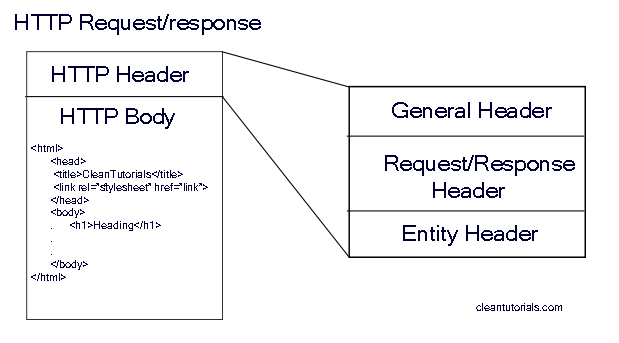
of context, there are four different types of headers:
These headers contain directives
that need to be followed, for both the requester and receiver. This can include
information regarding:
·
Caching directives.
·
Specified connection options.
·
The date (always listed in Greenwich Mean Time)
·
Pragma
·
Upgrade (for if the protocols need to be
switched)
·
Via (to indicate intermediate protocols)
·
Warning (for additional information not found
elsewhere in the header. There may be more than one warning listed.)
2.
Request Header: This type of header
contains information about the fetched request by the client.
Whenever you type a URL into the
address bar and try to access it, your browser sends an HTTP request to the
server. The HTTP request header contains information in a text-record form,
which includes particulars such as the:
·
Type, capabilities, and version of the browser
that generates the request.
·
Operating system used by the client.
·
Page that was requested.
·
Various types of outputs accepted by the
browser.
The HTTP Request Headers with
Example
·
Accept
-
Ex. Accept: application/json (The media
type/types acceptable)
·
Accept-Encoding
-
Ex. Accept-Encoding: gzip, deflate (List of
acceptable encodings)
·
Accept-Language
-
Ex. Accept-Language: en-US (List of acceptable
languages)
·
Accept-Datetime
-
Ex. Accept-Datetime: Thu, 31 May 2007 20:35:00
GMT (Request a past version of the resource prior to the DateTime passed)
·
Connection
-
Ex. Connection: keep-alive (Control options for
the current connection. Accepts keep-alive and close. Deprecated in HTTP/2)
·
Date
-
Ex. Date: Tue, 15 Nov 1994 08:12:31 GMT (The
date and time that the request was sent)
3.
Response Header: This type of headers
contains the location of the source that has been requested by the client.
Upon receiving the request
header, the Web server will send an HTTP response header back to the client. An
HTTP response header includes information in a text-record form that a Web
server transmits back to the client's browser. The response header contains
particulars such as the type, date and size of the file sent back by the
server, as well as information regarding the server.
The HTTP Response Headers with
example
·
Accept-Patch
-
Ex. Accept-Patch: text/example;charset=utf-8
(Specifies which patch document formats this server supports)
·
Accept-Ranges
-
Ex. Accept-Ranges: bytes (What partial content
range types of this server supports via byte serving)
·
Age
-
Ex. Age: 22 (The age the object has been in a
proxy cache in seconds)
·
Allow
-
Ex. Allow: GET, POST, HEAD (Valid methods for a
specified resource. To be used for a 405 Method not allowed)
·
Connection
-
Ex. Connection: close (Control options for the
current connection and list of hop-by-hop response fields. Deprecated in
HTTP/2)
·
Content-Encoding
-
Ex. Content-Encoding: gzip (The type of encoding
used on the data. See HTTP compression)
4.
Entity Header: This type of headers
contains the information about the body of the resources like MIME type,
Content-length.
These headers include information
regarding:
·
Allow (methods supported by the identified
resource)
·
Content Encoding.
·
Content Language.
·
Content Location.
·
Content Length.
·
MD-5 (for checking the integrity of the message
upon receipt).
·
Content-Range.
·
Content Type.
·
When it Expires.
·
When it was last modified.
Ref: ( https://www.cleantutorials.com/wp-content/uploads/2015/11/http-header-and-body.png)
Headers
can also be grouped according to how proxies handle them:
·
Connection
·
Keep-Alive
·
Proxy-Authenticate
·
Proxy-Authorization
·
TE
·
Trailer
·
Transfer-Encoding
End-to-end
headers
These headers must be transmitted to the final recipient of
the message: the server for a request, or the client for a response.
Intermediate proxies must retransmit these headers unmodified, and caches must
store them.
Hop-by-hop
headers
These headers are meaningful only for a single
transport-level connection and must not be retransmitted by proxies or cached.
Note that only hop-by-hop headers may be set using the Connection header.
Comments
Post a Comment